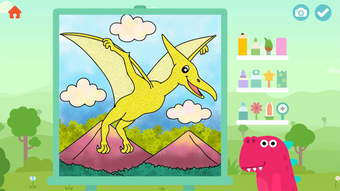

Download Yamo Coloring – Kids Coloring, Free Coloring, Creative Activities for Kids
Overview
Yamo Coloring is a free iPhone application designed to provide children with a safe and engaging platform for artistic expression. The software offers a wide selection of 144 coloring pictures, ensuring a diverse and continuous creative experience for young users. Its primary purpose is to support early childhood development through fun, interactive coloring activities that foster imagination, hand-eye coordination, and fine motor skills.
The app is tailored for children of all ages, making it suitable for toddlers, preschoolers, and young school-aged kids. With no third-party advertisements and no collection of user data, Yamo Coloring creates a secure digital environment where children can explore their creativity without exposure to inappropriate content or online risks. Real-world usage scenarios include home-based learning, classroom activities, and quiet time entertainment during travel or waiting periods.
The app’s intuitive design allows even the youngest users to navigate independently, promoting autonomy and confidence in digital interaction.
Key Features & Capabilities
- 144 Coloring Pages – A large library of diverse and age-appropriate illustrations ensures endless creative opportunities for children.
- 9 Coloring Brushes – Offers various brush styles to mimic different drawing tools, enhancing the realism and enjoyment of the coloring process.
- 36 Solid Colors – Provides a broad palette of vibrant, easy-to-apply colors for precise and satisfying coloring.
- 36 Gradient Colors – Enables children to experiment with smooth color transitions, adding depth and visual interest to their artwork.
- 36 Fill Patterns – Introduces textured coloring options, encouraging creativity and exploration of different visual effects.
- Local Save to Photo Album – Completed artworks can be saved directly to the device’s photo library for sharing or personal keepsakes.
- Privacy-First Design – No user data is collected, and the app contains no third-party ads, ensuring a safe experience for young users.
These features collectively support a rich and customizable coloring experience. For example, a child can use a gradient brush to color a rainbow, apply a fill pattern to a flower, and save the result to share with family. The combination of tools allows for artistic experimentation while remaining accessible to young users. The absence of online connectivity or data sharing further reinforces the app’s suitability for supervised or independent play.
User Interface, Workflow & Performance
The user interface of Yamo Coloring is designed with simplicity and child-friendliness in mind. Navigation is straightforward, allowing children to select a picture, choose a brush, pick a color, and begin coloring with minimal guidance. The layout emphasizes large, clearly labeled buttons and intuitive touch controls, reducing the learning curve for young users.
Workflow efficiency is high, as the app enables quick transitions between tools and images without lag or unnecessary steps. The developer did not specify resource usage details, so exact performance metrics such as CPU or RAM consumption remain unknown. However, based on general software behavior patterns, the app is expected to operate smoothly on modern iPhone devices.
Stability appears to be a priority, as the app functions entirely offline and avoids complex background processes. No reported crashes or freezes were mentioned in the provided information, suggesting consistent operation during typical usage.
Compatibility & System Requirements
Yamo Coloring is designed exclusively for iPhone devices and is compatible with the iOS operating system. The software version is 1.0.0, with a file size of 54.8 MB, indicating a lightweight installation that should not strain device storage. The developer did not provide additional system requirements, so exact hardware specifications such as processor type, RAM, or minimum iOS version are not available.
Compatibility information was partially provided, confirming support for iPhone models running iOS. Users should ensure their device meets the minimum requirements set by Apple for the App Store, but specific thresholds were not disclosed. The app is available as a standalone download and does not require an internet connection after installation, enabling offline use in various settings.
Pros and Cons
Pros
- Free to download and use with no in-app purchases or ads
- Extensive library of 144 coloring pages for sustained engagement
- Wide variety of tools including brushes, solid colors, gradients, and patterns
- Privacy-focused design with no data collection or third-party ads
- Artwork can be saved directly to the iPhone photo album
- Simple, intuitive interface suitable for young children
Cons
- No information on offline functionality beyond basic operation
- Limited to iPhone platform with no support for iPad or Mac
- Exact system requirements not specified by the developer
- App may lack advanced features for older or more experienced young artists
- Version 1.0.0 suggests it may be in early development with limited updates
FAQ Section
Is Yamo Coloring available for free?
Yes, Yamo Coloring is available for free on the App Store. There are no in-app purchases, subscriptions, or advertisements within the app.
Can I use Yamo Coloring offline?
The app functions without an internet connection after installation, allowing children to color anytime, anywhere.
Does Yamo Coloring collect user data?
No, the developer has confirmed that the app does not collect any user information or personal data.
Is Yamo Coloring safe for young children?
Yes, the app is designed with child safety in mind. It contains no third-party ads, in-app purchases, or data tracking.
Can I share my child’s artwork from Yamo Coloring?
Yes, completed coloring pages can be saved directly to the iPhone’s photo album for sharing with family or friends.
Final Thoughts
Yamo Coloring stands out as a thoughtful, child-centric application that delivers a safe and enriching creative experience. With its extensive library of coloring pages, diverse set of tools, and strong privacy protections, it serves as an excellent choice for parents and educators seeking a reliable digital coloring tool. The app’s free availability and lack of intrusive elements make it accessible to all families.
While it is limited to iPhone and lacks detailed system specifications, its core functionality is solid and well-suited for its intended audience. Children will enjoy the freedom to explore their imagination, while caregivers can rest assured that the app operates without hidden risks. For families looking for a secure, engaging, and fun coloring experience on iOS, Yamo Coloring is a valuable addition to any child’s digital toolkit.
Download Yamo Coloring now







